 hr
hr
 si
si
 sr
sr
 cs
cs





From Hiring Request to Published Job Ad in Gecko HRM
Follow a vacancy from the manager's hiring request to a reviewed job ad on your website. Prepare application questions, preview the result and review translations in Gecko.

Maja Sušnik, Marketing Specialist
Recruitment often starts with a message from a manager: we need another person on the team. HR then has to turn that request into a job ad and application form, with enough detail for candidates to decide whether to apply.
In Gecko, managers can start hiring requests from the home page. Recruiters pick them up in the system and prepare the ad for the company website. The redesigned experience brings the ad content, application questions and language versions into that preparation.
How Does the Manager Start the Request?
The manager enters the position they want to recruit for, how many people they need and any additional information. The recruiter then receives the request in Gecko, reviews it and can add further details.
If the vacancy is to be advertised, the recruiter can create the job ad. This gives the handoff a practical starting point: the manager explains the hiring need, and HR works through what candidates should read and what they need to tell you.
What Can You Reuse from the Existing Role?
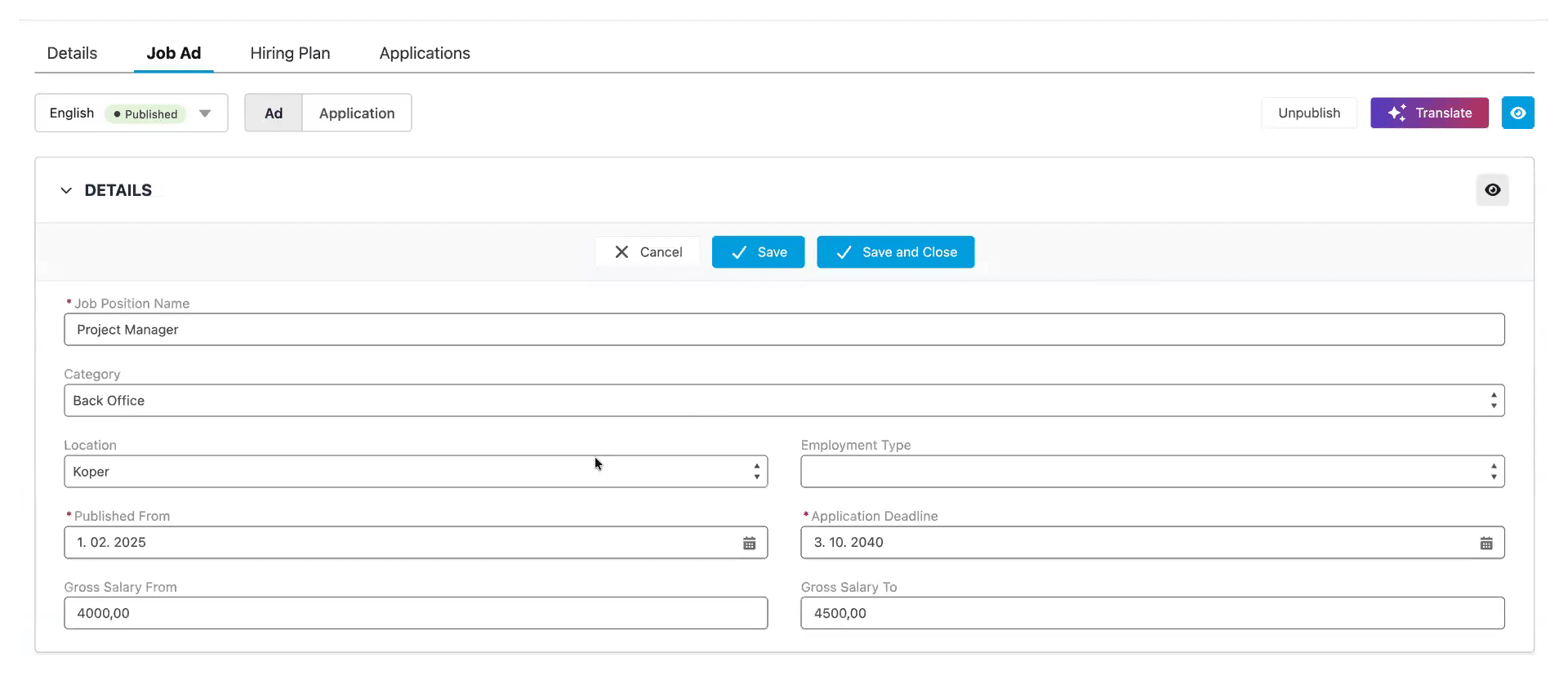
Gecko prefills job ad information where the relevant data is already available. You can edit the content, add sections and change their order, and include details such as location and salary range.
An internal job description and a public job ad have different jobs to do. The first records the position. The second needs to help someone understand the work and decide whether to apply. Existing information is useful, but it still deserves an editorial look.
For a maintenance engineer vacancy, for example, start with the existing position description, then make the responsibilities and required qualifications easy to find. If a detail is missing from Gecko, you still need to supply it.
Can the Application Form Fit the Vacancy?
Yes. Recruiters can select from the available application fields, change their order and decide which are required or optional. The form starts with defaults, so each vacancy does not need to be assembled from scratch.
You can also add screening questions for the particular role. In our hypothetical engineering vacancy, a question about a required professional qualification could help HR establish a relevant fact before arranging an interview. Another vacancy may need a different question entirely.
Before adding a question, ask what you’ll do with the answer. If it won’t help you assess or progress the application, it may not need a place on that form.
For fields, there’s one setup limit to know: recruiters choose from fields already made available in Gecko. If you need a completely new underlying field, a consultant must create it and add it to the selection.
A useful application form gives HR information it can act on, while asking candidates questions that make sense for the role.
Where Does AI Help with the Wording?
AI ad enhancement suggests refinements to content you have already written. You can review the suggestion and accept it, or keep your original wording. This is particularly useful when an accurate internal description needs to read more naturally for candidates.
Read each suggestion against the actual vacancy. Does it preserve the responsibilities? Are the qualifications still accurate? Does the wording promise anything the employer has not agreed to offer? Those checks belong with the recruiter, even when the suggested copy sounds polished.
How Do You Prepare Another Language Version?
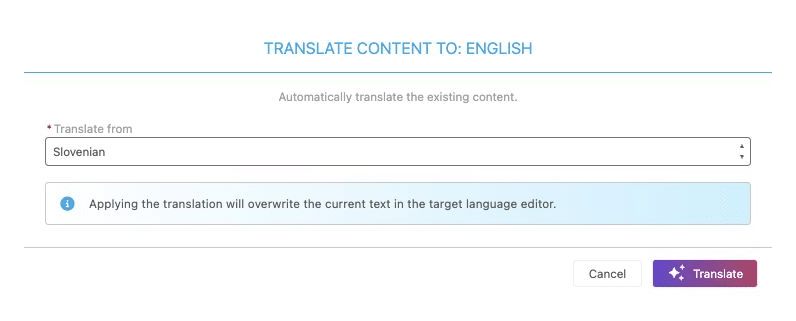
Once the ad content is ready in one language, you can use Gecko’s translation option to prepare it in another. Select the source language, generate the translation and review the result before publication.
Check job titles and specialist terms particularly carefully. Also review the application fields, their labels and answer options in the target language. Translating the ad is not a reason to skip checking the rest of the candidate experience.
The translation action replaces existing content in the target language, so check what is there before using it again. A reviewed local version is worth preserving.
What Can You Check Before Publishing?
Recruitment administrators can open a direct preview of the ad and application. It shows the sections, chosen fields, screening questions and agreements, so you can review the experience while building it. Submission is disabled in preview.
Return to the engineering vacancy and follow it through as an applicant would. Is the qualification mentioned clearly in the ad? Does the corresponding question make sense? Have you left an empty section or an untranslated label behind? The preview gives those small details somewhere to be spotted.
How Does the Job Ad Reach Your Website?
Confirm the hiring process before publication. With the process selected, content reviewed and website connection set up, the recruiter can publish the vacancy through Gecko’s embedded job-ad component, or iframe, on the company website. Applicants can then submit their applications there.
The request has now become a vacancy that people can apply for, with the relevant questions and language versions prepared. HR remains responsible for checking the content before it goes live.
The redesigned recruitment experience is available upon request. Existing Gecko customers can contact Customer Success about enabling it in their environment. To see how ad preparation could work for your team, book a Gecko HRM demo.
Watch our product team explain the recruiting forms right here:



You might also like
View all posts